Just a few days ago MTN stopped the usage of their blackberry plans on non-blackberry phones. This move affected a lot of individuals because it was more economical to use blackberry plans on other devices, especially android devices due to their high data consumption. Well there is a solution to that now, at least it is manageable. So how do you go about it?
Showing posts with label Internet. Show all posts
Showing posts with label Internet. Show all posts
Saturday, 20 July 2013

Thursday, 30 May 2013
Using MTN Blackberry Plan on Your Android Phones
In the previous post, how you can go ahead to use Airtel's blackberry subscription on your android phones was discussed. In this post, achieving the same thing ie using MTN's blackberry subscription on your android phones will be discussed.
To go about it, here is what you should do.
To go about it, here is what you should do.
Wednesday, 22 May 2013
Suitable Internet Bundles For Your Android Phones in Nigeria
It is well known among android phone users that the android operating system consumes a lot of data. Use of wifi would have been a suitable means of accessing the internet if only wifi hotspots were common in many places within the country. As a result of this, we are left to rely on our mobile telecommunication service providers for internet access.
It has been noticed that blackberry phone users enjoy the cheapest internet service in the country, with the blackberry plans providing more data for lesser costs when compared with smartphone internet plans. Some individuals have been complaining about this fact; why should such plans be available to blackberry phone users while other smartphone users pay more for less? It is known as a fact that blackberry phones offer data compression, thus consuming less data when compared to other phones.
It has however been discovered that the blackberry plans offered by some of the telecom companies in Nigeria, Airtel and MTN in particular, can be utilized on android phones as well. So how do we go about it?
It has been noticed that blackberry phone users enjoy the cheapest internet service in the country, with the blackberry plans providing more data for lesser costs when compared with smartphone internet plans. Some individuals have been complaining about this fact; why should such plans be available to blackberry phone users while other smartphone users pay more for less? It is known as a fact that blackberry phones offer data compression, thus consuming less data when compared to other phones.
It has however been discovered that the blackberry plans offered by some of the telecom companies in Nigeria, Airtel and MTN in particular, can be utilized on android phones as well. So how do we go about it?
Saturday, 19 January 2013
Browsing on Your PC Using MTN Blackberry Subscription
I have described in my earlier posts how to make use of both aitel and glo blackberry subscriptions to access the internet on your computers. This post will describe how to go about it using MTN blackberry subscription. Unlike airtel and glo, that of MTN is achieved with the aid of special softwares, known popularly as VPNs. VPN stands for virtual private network.
Several of such VPN exists. Some of them include pdproxy, tweakwarevpn, tunnel guru, sandwich vpn, and so on.
Tuesday, 15 January 2013
Browsing on Your PC Using GLO Blackberry Subscription
In my last post, i discussed the procedures to follow in order to be able to browse on your laptops or PCs using airtel's blackberry plan. In this post, i will post how to achieve the same thing using glo blackberry subscription. It is worth noting that glo's blackberry plan is cheaper than that of airtel in the sense that with glo, you get 3GB of data with N1,200 whereas airtel gives you only 1GB of data for the same amount.
Monday, 14 January 2013
Browsing On Your PC Using Airtel's Blackberry Subscription

Monday, 20 August 2012
Access Point Settings For Internet Service Providers
In my previous posts, i discussed how to unlock both Huawei and ZTE modems to make them universal. Having made them universal, you need to manually create access points for the different network providers since the interface the modem came with will contain the settings for only the network that the modem was locked to. In this post, I will give the different settings for the different GSM networks.
The table below gives the different settings for the different networks.
The table below gives the different settings for the different networks.
Friday, 17 August 2012
Unlocking ZTE Modems
In my
previous article, I discussed how to unlock huawei modems. These modems are
popular with mtn and glo networks though etisalat and airtel have a few of
them. ZTE modems are common with etisalat though the other networks also issue
out some of them. These ZTE modems have a less beautiful user interface (at
least in my opinion) compared with that of huawei modems.

Unlike
huawei modems, ZTE modems can't be unlocked using the unlock codes, or probably
because the codes calculated by the softwares I’ve used to far must be wrong.
You must be wondering then how to go about unlocking ZTE modems. You need software
to do the unlocking. This software doesn't calculate the unlock code for ZTE
modems rather it unlocks it directly. The name of this software is dc-unlocker.
Some websites refer to it as dccrap. So how do you use it?
Like I
said in the post on how to unlock huawei modems, you insert an alien SIM card
into the modem, and then plug it into your computer. Then open up the
dc-unlocker. Under “select manufacturer”, select ZTE data cards. Under “select
model”, select the model of the modem or leave it on “auto detect”. If the
model of your modem isn’t listed there, then select “unknown ZTE modem”. After you
must have made these selections, click on the photo with the magnifying glass
icon on it. Then click on “unlocking” and then click on unlock. Voila! It’s as
simple as that.

To
download the DC-Unlocker, click here. For any enquiries or comments, don’t
forget to use the comment box below.
Sunday, 12 August 2012
How To Unlock Huawei USB Internet Modems
In a
previously written article, I discussed some reasons why I prefer to use a
previously unlocked dongle to using a universal one. In this article, I will
write about how to go about unlocking modems that have been locked to the
particular network they are branded to. Several
companies manufacture modems. The popular of these companies or rather the
companies whose modems are common in Nigeria are Huawei and ZTE. In this
article, I will discuss how to unlock modems manufactured by Huawei.
Each
modem or dongle has a 15-digit number referred to as its IMEI number. For Huawei
modems, the IMEI number is used to calculate the unlock code. What do I mean by
the unlock code? If you’ve ever tried using a modem belonging to a particular
network with an alien SIM card (I mean a SIM card belonging to a different
network), once you insert the modem into your computer, a small dialog box
comes up demanding for the unlock code. The unlock code is tied to the IMEI
number. In other words the IMEI number is used to calculate the unlock code as I
mentioned earlier. You can get the IMEI number from the modem pack or on the
body of the modem. If you do not see it there, don’t panic. Simply insert the
modem into your computer then open up the modem interface. On the interface,
click on the “Tools” tab and select “Diagnostics”. You should be able to get
the IMEI number from there.
There are
softwares that calculate the unlock code of the modem from the IMEI number. The
one which I use regularly is called HUAWEI UNLOCKER. I’ll give a link to
download it towards the end of this article. The software only demands that you
input the 15-digit IMEI number into it and it automatically calculates the
unlock code together with the flash code. Copy out the unlock code. DO NOT copy
the flash code. The next thing you do is to insert an alien SIM card into the
modem, then plug the modem into a USB port on your computer. Wait a moment. The
dialog box requesting for the unlock code should come up. Enter the unlock code
into the text box provided and voila, your modem becomes unlocked. You have ten
(10) attempts to input the correct unlock code. If the dialog box doesn’t come
up, two things could cause that. Either the modem has already been unlocked or
that the number of times that has been given for the correct unlock code to be
entered has been exhausted in which case it can no longer be unlocked.

After
reading this article, I don’t think you should have any problems unlocking your
Huawei USB modems. If you encounter any problems, just use the comment box
below and I’ll respond as soon as possible.
To download
the HUAWEI UNLOCKER, click here .
Deciding On Which Internet Modem To Buy
There are
several network providers in the country, each of which have different qualities
of service depending on your geographical location. While a network may have an
excellent service in a particular location, the same may not be said for
another location. Also, the various networks offer their internet services at
different rates which may or may not be convenient to you. Now, considering the
fact that these modems are most of the time (if not always) locked to one
particular network, it becomes vital that you make a careful decision on which
internet dongle you buy. I know
you may be thinking if you buy an internet dongle locked to a particular
network and then somewhere along the line you decide that you are no longer
satisfied with the quality of the service you are receiving from them, you will
have to spend money all over again buying another dongle. I am telling you that
you do not have to worry about that anymore. How do you do that? Don’t worry.
Just continue reading.
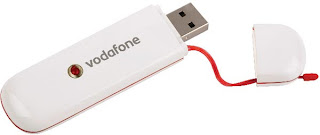
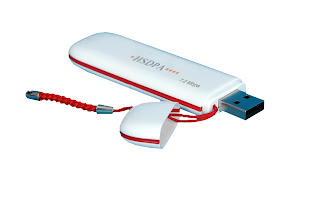


There
are however some modems which are not locked to any particular network. These
are popularly known as universal modems. You just simply buy the SIM card of
any network you desire and slot it into the modem, create an access point for
the network you desire and start surfing with it. While most people decide to
go for this particular type of modem, I advise against it. Why? In my
experience, some of them are not as good as the ones locked ones sold by the
network providers.The signal strength it
receives may not be as strong as the one you get when you use a ‘locked
modem’. Also, the cost of some of these universal modems is greater that that
of some of the locked ones. Considering these factors, what am I then
suggesting?
I am simply suggesting that you buy one of the ‘locked
modems’ and get it unlocked. This way, you get a universal modem of better
quality. Some of the computer experts charge a fee for this but you can do this
yourself. You only need a few softwares to achieve this. In my subsequent
posts, I will give the names of these softwares, links to download them and a
guide on how to use them. So stick around.
Subscribe to:
Posts (Atom)